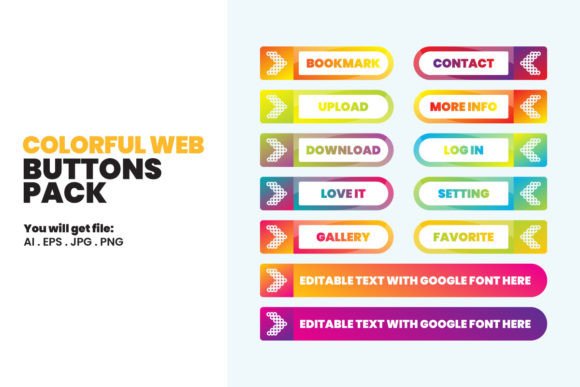
Colorful Web Buttons Pack: A Practical Review for Designers and Developers
In the fast-paced world of web design, user interface elements serve as the critical bridge between aesthetic appeal and functional navigation. Among these elements, call-to-action buttons are perhaps the most significant, directly influencing conversion rates and user engagement. For designers seeking efficiency without sacrificing quality, the Colorful Web Buttons Pack offers a compelling solution. This digital resource provides a curated collection of high-quality button designs that balance modern minimalism with vibrant visual interest. However, before integrating any pre-made asset into a professional workflow, it is essential to understand its specifications, versatility, and how it compares to custom design or other stock resources.
Understanding the Asset Composition and Format Versatility
The primary value of the Colorful Web Buttons Pack lies in its multi-format delivery. Unlike many stock libraries that offer only rasterized images, this pack includes source files that allow for deep customization. The inclusion of an Adobe Illustrator (AI) file and an EPS file is particularly significant for professional designers. These vector-based formats ensure that buttons can be scaled to any size—from a small mobile icon to a large desktop banner—without any loss of resolution or clarity. This scalability is a non-negotiable requirement in responsive web design, where elements must adapt seamlessly across various screen densities.
Furthermore, the compatibility extends beyond the Adobe ecosystem. The EPS format ensures that users working with Corel Draw can open and edit the files with ease. This cross-platform flexibility is a crucial consideration for agencies or freelancers who may not standardize on a single software suite. For those who prefer quicker, less technical adjustments, the pack also includes High Resolution JPG files and Transparent PNG files. The transparent PNGs are especially useful for immediate implementation in web projects where background blending is necessary, allowing developers to drop the assets directly into HTML/CSS structures without additional editing.
Design Aesthetics: Minimalism Meets Vibrancy
The design philosophy behind the Colorful Web Buttons Pack centers on an "elegant minimal" approach. In contemporary UI/UX design, clutter is the enemy of conversion. Users expect clean, intuitive interfaces that guide their attention rather than distract from it. These buttons achieve this by utilizing solid, vibrant colors paired with simple geometric shapes and subtle shadows or gradients. This style aligns well with current design trends such as Material Design and Flat UI, which prioritize usability and visual hierarchy.
When evaluating this pack against generic stock button collections, the distinction often lies in the cohesion of the color palette. Many free or low-cost resources offer disjointed styles that require significant time to harmonize with a brand’s existing identity. In contrast, this pack is designed with a consistent visual language. The "ready to use" nature of the files means that a designer can select a button style that complements their project’s theme with minimal adjustment. However, it is important to note that "minimal" does not mean "generic." The careful selection of hues ensures that the buttons remain eye-catching enough to serve their primary purpose: prompting user action.
Comparing Pre-Made Packs vs. Custom Design
A common dilemma for web professionals is deciding whether to use a pre-made asset pack like the Colorful Web Buttons Pack or to design buttons from scratch. Both approaches have distinct tradeoffs regarding time, cost, and uniqueness.
Custom Design offers total creative control. If a project requires a highly specific interaction state, a unique animation, or a brand-specific shape that deviates from standard norms, custom design is the only viable path. It ensures that no other website will have the exact same interface elements. However, this comes at the cost of time and resources. Designing, testing, and exporting multiple button states (hover, active, disabled) for every variation can consume hours of a designer’s schedule.
On the other hand, using a pre-made pack significantly accelerates the workflow. For startups, small businesses, or projects with tight deadlines, the ability to download, edit, and implement high-quality buttons instantly is invaluable. The Colorful Web Buttons Pack serves as an excellent middle ground. Because the files are editable vectors, designers are not locked into the default appearance. They can modify colors, adjust corner radii, or tweak typography to better align with brand guidelines. This hybrid approach allows for the speed of stock assets with a degree of customization that approaches bespoke design.
Best-Fit Scenarios and Limitations
Identifying when to use this resource is key to maximizing its value. The Colorful Web Buttons Pack is ideally suited for:
- Rapid Prototyping: When building mockups for client presentations, having a library of polished buttons allows designers to focus on layout and user flow rather than getting bogged down in pixel-perfect details.
- Small Business Websites: For portfolios, landing pages, or e-commerce sites with limited budgets, these assets provide a professional look without the expense of hiring a UI specialist for micro-elements.
- Non-Designer Developers: Developers who need to populate a site with visually appealing elements but lack advanced graphic design skills can benefit greatly from the transparent PNGs and easy-to-edit AI files.
However, there are limitations to consider. While the pack is "easy to edit," it is not a dynamic component library. If a project requires complex interactive states, such as animated loaders or intricate hover effects triggered by JavaScript, the static images provided will need to be supplemented with CSS or SVG code. Additionally, while the design is elegant, it may not suit brands that require a highly illustrative, textured, or vintage aesthetic. In such cases, the minimal vector style might feel too clean or corporate.
Technical Considerations and File Management
From a technical standpoint, the inclusion of vector files (AI and EPS) supports best practices for web performance. Vectors can be exported as SVGs, which are lightweight and scale perfectly on retina displays. This is a significant advantage over relying solely on JPGs, which can become pixelated or result in larger file sizes if high resolution is maintained. The High Resolution JPG files included in the pack are suitable for fallbacks or specific use cases where vector support is limited, but modern web development strongly favors vector-based workflows.
It is also crucial to address the licensing and usage terms. This is a DIGITAL download, meaning no physical items will be shipped. Buyers receive immediate access to the files, facilitating quick integration into ongoing projects. However, users must adhere to strict intellectual property guidelines. The actual files cannot be shared or resold in any form. This restriction protects the creator’s work and ensures that the resource remains exclusive to paying customers. For professional use, this means the buttons can be used in client projects, but the source files themselves cannot be redistributed as part of a template or toolkit sold to third parties.
Making an Informed Decision
Choosing the right design resources is about balancing efficiency with quality. The Colorful Web Buttons Pack stands out as a robust option for professionals who value versatility and ease of use. Its strength lies in the combination of editable vector sources and ready-to-use raster images, catering to both designers and developers. By offering compatibility with major design tools like Adobe Illustrator and Corel Draw, it removes barriers for a wide range of users.
Ultimately, this pack is best viewed as a productivity tool rather than a complete design solution. It excels in providing a strong foundational layer for UI elements, allowing creators to focus their energy on broader structural and experiential aspects of web design. For those seeking a reliable, aesthetically pleasing, and technically flexible set of interface components, this resource offers a practical and efficient path forward. As with any digital asset, the key to success lies in thoughtful customization—using the provided files as a starting point to create interfaces that are not only beautiful but also uniquely aligned with your project’s goals.