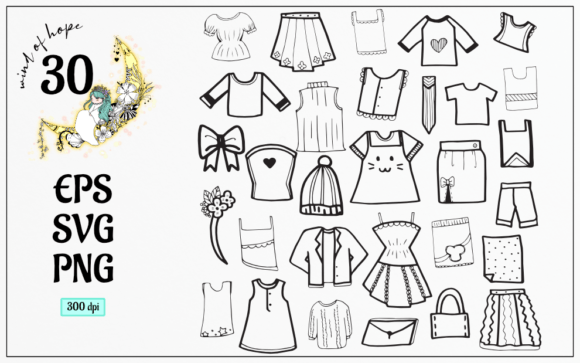
Clothes Doodle Element: A Practical Evaluation for Designers
In the realm of digital design, efficiency and aesthetic consistency are paramount. Whether you are developing a brand identity, creating social media content, or designing print-on-demand products, the visual assets you choose play a critical role in the final outcome. The Clothes Doodle Element collection represents a specific category of graphic resources designed to streamline this process. This article provides an objective evaluation of this asset pack, examining its components, technical specifications, and suitability for various design workflows.
Understanding the Clothes Doodle Element Collection
The term "doodle" in graphic design typically refers to hand-drawn, informal, or sketch-like illustrations that convey a sense of playfulness, authenticity, or approachability. The Clothes Doodle Element pack focuses specifically on apparel-related imagery. These elements often include items such as t-shirts, dresses, hats, shoes, and accessories, rendered in a simplified, artistic style. Unlike photorealistic stock photography, doodle elements are vector-based or high-resolution raster images that prioritize shape and line over intricate texture.
For designers, these elements serve as modular building blocks. They can be used individually as icons or combined to create complex compositions. The primary value proposition lies in the time saved by not having to illustrate these common items from scratch, allowing creators to focus on layout, typography, and overall composition.
Technical Specifications and File Formats
When evaluating any digital asset pack, understanding the file formats included is essential for determining compatibility with your existing software and workflow. The Clothes Doodle Element package is delivered as a compressed ZIP file containing three distinct format types, each serving a specific purpose.
- EPS File: Encapsulated PostScript (EPS) is a standard vector format. It is widely supported by professional design software such as Adobe Illustrator, CorelDRAW, and Affinity Designer. The inclusion of an EPS file ensures that the doodles can be scaled to any size without loss of quality, making them suitable for large-format printing like banners or billboards.
- SVG File: Scalable Vector Graphics (SVG) is another vector format, but it is optimized for web use. SVGs are lightweight and can be directly embedded into HTML code, making them ideal for web designers who need crisp icons that load quickly and remain sharp on high-resolution displays.
- 30 PNG Files (300dpi): Portable Network Graphics (PNG) are raster images. This pack includes 30 individual PNG files, each rendered at 300 dots per inch (dpi) with a translucent background. The high resolution ensures print quality, while the transparent background allows for easy layering over other designs without the need for manual background removal.
The combination of vector and raster formats provides versatility. Vector files (EPS/SVG) are best for editing and scaling, while PNGs offer immediate usability for quick composites or platforms that do not support vector imports.
Benefits and Practical Applications
Integrating the Clothes Doodle Element into your design toolkit offers several practical advantages. First, it ensures visual consistency. When all elements share the same artistic style, line weight, and perspective, the resulting design feels cohesive. This is particularly important for branding materials where a unified look is necessary.
Second, the translucent background of the PNG files significantly reduces editing time. Designers can drag and drop these elements directly into their projects, adjusting opacity or blending modes as needed. This feature is especially beneficial for social media managers and content creators who need to produce high volumes of graphics under tight deadlines.
Common applications for these elements include:
- E-commerce and Retail: Enhancing product descriptions or promotional banners with playful illustrations of clothing items.
- Fashion Blogging and Media: Creating engaging headers, infographics, or editorial illustrations that complement written content.
- Print-on-Demand Products: Designing patterns or graphics for tote bags, notebooks, and apparel where a hand-drawn aesthetic appeals to the target audience.
- Educational Materials: Illustrating concepts related to fashion design, textile history, or personal styling in a visually accessible way.
Considerations and Tradeoffs
While the Clothes Doodle Element pack offers convenience, it is important to consider potential limitations. The "doodle" style, by definition, is informal. This may not align with brands that require a corporate, minimalist, or hyper-realistic aesthetic. Before purchasing or downloading, evaluate whether the artistic style matches your brand voice.
Additionally, while vector files are editable, the degree of customization depends on your skill level and software. Modifying complex vector paths requires proficiency in tools like Adobe Illustrator. If you are a beginner, you may find yourself limited to using the elements as-is, which could restrict creative flexibility.
Another consideration is exclusivity. Popular asset packs are often downloaded by many users. If distinctiveness is a primary goal, relying solely on pre-made elements may result in designs that resemble others in the market. To mitigate this, consider combining these doodles with unique typography, color palettes, or custom illustrations.
When to Choose This Asset Pack
The Clothes Doodle Element is a strong fit for projects that prioritize speed, consistency, and a friendly, approachable tone. It is particularly valuable for:
- Small Business Owners: Who lack the budget for custom illustration but need professional-looking graphics.
- Web Designers: Who need scalable icons for e-commerce sites or fashion-related apps.
- Social Media Managers: Who require quick, eye-catching visuals for Instagram, Pinterest, or Facebook posts.
If your project involves frequent updates or requires a large volume of varied clothing-related imagery, this pack provides a cost-effective solution. The inclusion of both vector and raster formats ensures that you can adapt the assets to both digital and print mediums seamlessly.
When to Consider Alternatives
There are scenarios where alternative resources may be more appropriate. If your project demands highly specific or unique clothing items not covered in the standard doodle set, custom illustration or specialized stock photography might be necessary. Similarly, if your brand guidelines strictly prohibit hand-drawn styles, you should look for geometric or photographic assets instead.
Furthermore, if you require extensive animation capabilities, while SVGs can be animated via CSS or JavaScript, complex motion graphics might be better served by After Effects templates or dedicated motion design assets.
Making an Informed Decision
To determine if the Clothes Doodle Element aligns with your needs, assess your current workflow. Do you frequently spend time searching for consistent clothing icons? Do you have the software to utilize EPS and SVG files? If the answer is yes, this pack can significantly enhance your productivity. However, if your design requirements are highly niche or demand a different aesthetic, it may be worth exploring other specialized libraries.
Ultimately, the value of this asset pack lies in its versatility and ease of use. By providing multiple file formats and a cohesive artistic style, it offers a practical solution for designers seeking to elevate their visual content without compromising on efficiency. As with any design resource, the key is to integrate these elements thoughtfully, ensuring they complement rather than dominate your overall creative vision.