Integrating the Whoa Sign Collection into Professional Design Workflows
In the fast-paced environment of digital content creation, visual communication often needs to happen instantly. Whether you are designing a safety manual, creating social media graphics that require a pause for effect, or developing educational materials that highlight critical warnings, the right visual cue can make or break user engagement. This is where a specialized asset library like the Whoa Sign Collection becomes an invaluable resource for creators, marketers, and business owners. It is not merely a set of images; it is a functional toolkit designed to streamline the integration of high-impact visual signals into your existing projects.
Understanding how to effectively deploy these assets requires more than just downloading files. It involves recognizing where they fit within your broader design process, ensuring technical compatibility with your software stack, and maintaining consistency across your brand’s visual language. By treating this collection as a strategic component of your workflow rather than an afterthought, you can significantly reduce production time while enhancing the clarity and professionalism of your output.
Technical Versatility and File Format Optimization
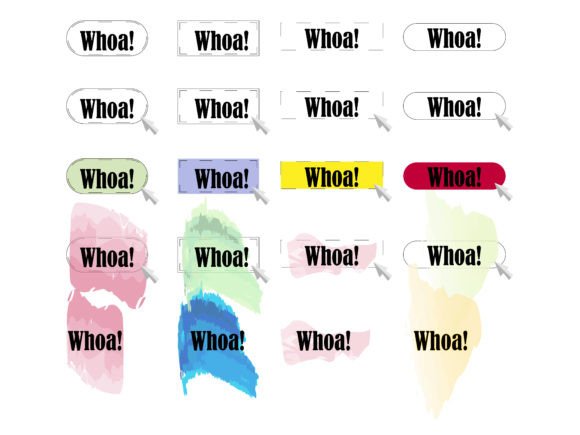
The true value of any digital asset library lies in its flexibility. The Whoa Sign Collection is structured to accommodate a wide range of professional needs, from quick social media posts to large-format print campaigns. When you acquire this collection, you receive a comprehensive suite of file formats specifically chosen to eliminate friction during the implementation phase. Understanding which format to use at each stage of your project is crucial for maintaining efficiency and quality.
- 20 PNG files at 300dpi: These are your go-to assets for immediate use in web design, presentations, and digital documents. The 300dpi resolution ensures that even if these images are printed in small formats, such as flyers or brochures, they remain crisp and free of pixelation. The transparent background inherent to PNG files allows you to layer these signs over photographs, colored backgrounds, or complex textures without needing additional editing.
- 20 SVG files (vertical and horizontal orientation): Scalable Vector Graphics are essential for modern responsive web design. Because SVGs are vector-based, they can be scaled to any size without losing quality. This makes them ideal for icons on mobile apps, website headers, or interactive elements where load speed and clarity are paramount. The inclusion of both vertical and horizontal orientations provides layout flexibility, allowing you to adapt the sign to narrow sidebars or wide banners seamlessly.
- 1 EPS file with all designs: Encapsulated PostScript is a standard format for professional printing and legacy design software. If you are working with older versions of design tools or sending files to a print shop that requires specific vector inputs, the EPS file ensures compatibility. It contains all the designs in a single package, simplifying file management for large-scale print runs.
- 1 AI file with all designs: For Adobe Illustrator users, the native AI file is the most powerful tool in the collection. It allows for complete editability. You can change colors to match your brand palette, adjust line weights, or modify text elements directly within the source file. This level of customization is vital for maintaining brand consistency across different marketing channels.
- 1 JPG file with all designs: While less flexible than PNG or SVG, the JPG serves as a quick-preview catalog or a lightweight option for internal mockups where transparency is not required. It allows stakeholders to review the entire collection quickly without opening heavy design software.
Strategic Implementation in Content Creation
Integrating the Whoa Sign Collection into your workflow should be a deliberate process. It is not enough to simply drop a graphic into a layout; you must consider the psychological impact and the contextual relevance of the sign. These visuals are designed to arrest attention, so their placement should be strategic. In a marketing funnel, for example, a "Whoa" sign might be used in a landing page to highlight a surprising statistic or a limited-time offer, effectively pausing the user’s scroll and directing focus to a call-to-action.
For educators and trainers, these signs can serve as visual anchors in presentation decks. When discussing common mistakes or critical safety protocols, inserting a high-contrast sign from the collection can reset the audience’s attention span. The key is consistency. If you use a specific style of warning sign in one module, ensure you use the same stylistic approach throughout the course to avoid confusing the learner. The variety of orientations in the SVG files allows you to maintain this consistency regardless of slide layout constraints.
Workflow Integration and Quality Control
To maximize the utility of this collection, consider establishing a standardized protocol for how these assets are accessed and modified within your team. For freelancers and small business owners, this might mean creating a dedicated folder in your cloud storage system where the AI and EPS files are stored as master copies, while PNGs are exported to a separate "Web Ready" folder. This separation prevents accidental overwriting of source files and ensures that team members always grab the correct format for their specific task.
Quality control is another critical aspect of implementation. Before deploying any sign from the collection into a client-facing project, verify that the colors align with your current brand guidelines. Using the AI file, you can quickly batch-edit the color profiles of the vectors to match your corporate identity. This step is often overlooked but is essential for maintaining a professional appearance. A mismatched color palette can make even the most well-designed graphic look amateurish and disjointed from the rest of your content.
Furthermore, consider the accessibility implications of your design choices. When using these signs in digital formats, ensure that they are accompanied by appropriate alt text describing the visual cue. For instance, if a "Whoa" sign is used to indicate a hazard, the alt text should clearly state "Warning: Hazard Ahead" rather than just "Sign." This practice ensures that your content remains inclusive and compliant with web accessibility standards, broadening your reach to users with visual impairments.
Long-Term Value and Scalability
Investing in a versatile asset library like the Whoa Sign Collection offers long-term benefits beyond individual projects. As your business or creative practice grows, having a reliable repository of high-quality, editable graphics reduces the need to commission custom illustrations for every new campaign. This scalability is particularly valuable for agencies and marketers who manage multiple clients with diverse needs. The ability to quickly customize a vector sign to fit a client’s brand colors can significantly reduce turnaround times and increase profit margins.
Moreover, the durability of vector formats means that these assets will remain relevant regardless of technological shifts. As screen resolutions increase and new display technologies emerge, SVG and AI files will continue to render perfectly, whereas raster images may eventually require replacement. By building your workflow around scalable vector graphics, you future-proof your design assets and ensure consistent quality across all platforms, from smartwatches to billboards.
In conclusion, the Whoa Sign Collection is more than a set of graphics; it is a strategic tool for enhancing visual communication. By understanding the technical specifications of each file format, integrating these assets thoughtfully into your content strategy, and maintaining rigorous quality control, you can elevate the professionalism and impact of your work. Whether you are a solo entrepreneur looking to streamline your social media presence or a large team managing complex educational materials, this collection provides the flexibility and reliability needed to execute your vision efficiently.