Mastering Visual Storytelling with the Foodies Style Instagram PSD Template
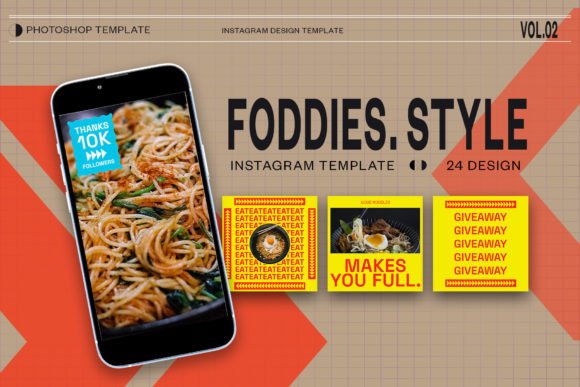
In the hyper-competitive landscape of social media marketing, particularly within the culinary and lifestyle sectors, visual consistency is not merely an aesthetic choice; it is a strategic imperative. For food bloggers, restaurant owners, and digital creators, the pressure to produce high-quality, engaging content on a daily basis can be overwhelming. This is where specialized design resources become invaluable. The Foodies Style Instagram PSD Template emerges as a critical tool for streamlining this creative process, offering a bridge between professional graphic design standards and efficient content production. By leveraging pre-designed structures, creators can focus less on the technicalities of layout and more on the narrative power of their imagery.
The Architecture of Efficient Design
At its core, a PSD (Photoshop Document) template serves as a foundational blueprint for digital graphics. The specific architecture of the Foodies Style template is designed to accommodate the dual needs of static feed posts and dynamic stories. Understanding the technical specifications is the first step toward maximizing its utility. The template operates at a resolution of 300 dpi (dots per inch). While screen displays typically render at 72 dpi, working at 300 dpi ensures that if any element of the design is ever repurposed for print materials—such as menus, flyers, or promotional posters—the image quality remains crisp and free of pixelation. This forward-thinking approach saves time in the long run by eliminating the need to recreate assets for different mediums.
Furthermore, the color profile is set to RGB (Red, Green, Blue). This is the standard color model for all digital screens, ensuring that the vibrant colors of fresh produce, rich sauces, and plated desserts appear exactly as intended on smartphones and tablets. Using a CMYK profile, which is reserved for printing, would result in duller, inaccurate colors on social platforms. By adhering to RGB, the template guarantees color fidelity across devices, a crucial factor when trying to evoke appetite and engagement through visual stimuli.
Navigating Dimensions: Feed vs. Story
One of the most significant advantages of this comprehensive package is its inclusion of multiple dimension formats, specifically tailored for Instagram’s evolving interface. The template provides layouts for both the traditional square feed post (1080 x 1080 px) and the vertical story format (1920 x 1080 px, though often adjusted to 1080x1920 for full-screen mobile viewing, the provided aspect ratio covers wide-format needs or specific story elements).
The square format remains a staple for grid aesthetics, allowing for a cohesive look when users browse a profile. It offers a balanced canvas that works well for single hero shots of dishes or collages of ingredients. Conversely, the story format utilizes vertical real estate to create immersive, full-screen experiences. This distinction is vital because user behavior differs between the two; feed posts are often consumed passively during scrolling, while stories invite active interaction through taps and replies. Having a unified design language across both formats strengthens brand recognition, making it instantly identifiable to followers regardless of where they encounter the content.
The Power of Smart Objects in Workflow Optimization
For many creators, the intimidation factor of Adobe Photoshop lies in its complexity. However, the Foodies Style Instagram PSD Template mitigates this through the intelligent use of Smart Objects. This feature is the cornerstone of the template’s ease of use, transforming a potentially hours-long design task into a matter of minutes. Smart Objects allow users to insert their own photographs without altering the underlying design structure, such as shadows, reflections, masks, or perspective warps.
The workflow is remarkably straightforward and requires no advanced graphic design skills. To utilize this feature, one simply needs to locate the designated image layer within the Photoshop layers panel. By double-clicking on the image layer or clicking twice on the layer icon within the image group, a new tab opens containing the placeholder image. Here, the user can paste or drag and drop their own high-resolution food photography. Once the image is positioned and scaled to fit the frame, the user performs a simple save command (CTRL + S or Command + S on Mac). Upon saving, the main document automatically updates, seamlessly integrating the new photo into the pre-styled layout. This non-destructive editing process ensures that the original template remains intact for future use, allowing for infinite variations without degrading image quality.
Customization and Brand Identity
While the visual framework is pre-established, the template is far from rigid. A key requirement for modern social media branding is the ability to inject unique voice and identity into every post. This template supports full text editability via the standard text tool. Users can modify headlines, captions, price tags, or promotional details to suit specific campaigns. Whether announcing a new seasonal menu, sharing a recipe tip, or promoting a limited-time offer, the typography can be adjusted to match brand guidelines.
This flexibility extends to font selection, size, color, and spacing. For instance, a high-end fine dining establishment might opt for elegant, serif fonts with minimal text to convey sophistication, while a casual burger joint might choose bold, sans-serif typefaces with vibrant colors to express energy and fun. The ability to tweak these elements ensures that the template serves as a versatile vessel for diverse brand personalities, rather than a one-size-fits-all solution that dilutes individual identity.
Strategic Applications for Various Creators
The utility of the Foodies Style template extends beyond individual food bloggers. Restaurants and cafes can use it to maintain a consistent posting schedule without hiring a full-time graphic designer. By batching content creation—shooting multiple dishes in one session and then plugging them into the template throughout the week—businesses can ensure a steady stream of high-quality visuals. This consistency is algorithmically favorable, as social platforms tend to reward accounts that post regularly and maintain high engagement rates.
Marketing agencies managing multiple culinary clients also benefit significantly from this resource. The standardized structure allows for rapid prototyping and approval processes. Clients can visualize how their dishes will look in a professional context quickly, facilitating faster decision-making. Additionally, educators in culinary arts or nutrition can use these templates to create visually appealing educational content, breaking down complex recipes or nutritional facts into digestible, attractive graphics that resonate with students and followers alike.
Enhancing Engagement Through Visual Hierarchy
Effective design is not just about making things look pretty; it is about guiding the viewer’s eye. The Foodies Style template is constructed with principles of visual hierarchy in mind. It strategically places emphasis on the food imagery, ensuring that the dish remains the hero of the composition. Secondary elements, such as text overlays or decorative graphics, are positioned to complement rather than compete with the main subject. This balance is crucial for stopping the scroll—a phenomenon where users pause their endless feeding to engage with a particular post.
By using high-contrast areas and clear focal points, the template helps highlight the texture, color, and freshness of the food. For example, a steam effect overlay or a subtle shadow can add depth, making a flat image appear three-dimensional and tangible. These subtle cues trigger sensory responses in viewers, increasing the likelihood of likes, comments, and shares. In an era where attention spans are fleeting, such design nuances can make the difference between a post being ignored or going viral.
Technical Considerations for Optimal Results
To fully leverage the potential of the Foodies Style Instagram PSD Template, users must pay attention to the quality of their source images. Since the template handles layout and styling, the input photograph must be sharp, well-lit, and properly composed. Poor lighting or blurry images cannot be fully corrected by a template. Therefore, investing time in basic food photography techniques—such as natural lighting, proper white balance, and clean plating—is essential.
Additionally, when exporting the final files for Instagram, it is important to save them in the correct format, typically JPEG or PNG, with optimization for web use. While the working file is 300 dpi, the exported file should be compressed appropriately to meet Instagram’s file size limits without sacrificing visible quality. Understanding this transition from high-resolution working file to optimized web asset is part of mastering the digital workflow.
In conclusion, the integration of specialized tools like the Foodies Style Instagram PSD Template into a content strategy represents a shift towards smarter, more sustainable creative practices. By combining technical precision with user-friendly features like Smart Objects and editable text, it empowers creators to produce professional-grade content efficiently. As the digital landscape continues to evolve, the ability to adapt quickly while maintaining high visual standards will remain a key determinant of success for food-related brands and influencers.